Watermark Architecture: Deep Dive into Vector Overlay Logic
 Md.R K
— Senior PDF Engineer & Browser Security Specialist
11 min read
Md.R K
— Senior PDF Engineer & Browser Security Specialist
11 min read
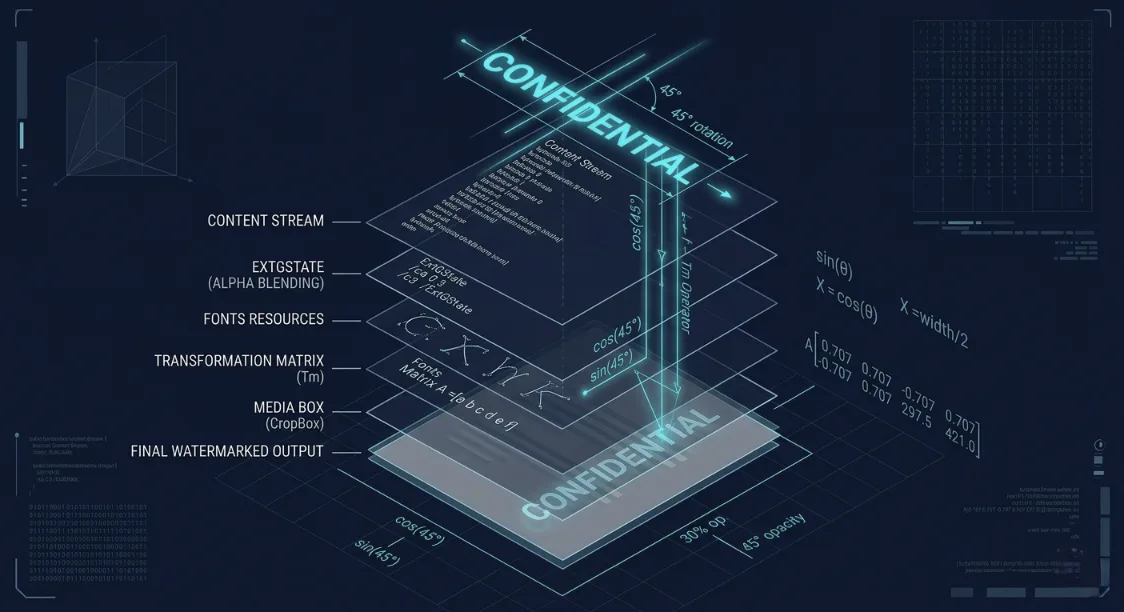
⚡ The Engineering Challenge
How do you reliably stamp a security watermark across a 500-page document in a browser without completely crashing the user's RAM, destroying the text resolution, or bloating the file size to 10x its original weight? The answer lies in avoiding image processing entirely, and instead injecting mathematical vector paths directly into the PDF content stream.
When building PDFteq's watermark engine, we faced a fundamental architectural decision. Many low-end PDF tools "watermark" a document by rendering the PDF page to a raster image (like a JPEG), drawing text over that image, and saving the massive, blurry result back to a PDF. This is computationally expensive, destructive to text selection, and completely unacceptable for professional workflows.
To provide high-fidelity, client-side document processing, we had to manipulate the PDF at the bytecode level using the rules defined in the ISO 32000-1 specification. Here is exactly how our vector overlay algorithm works.
📋 Architectural Deep Dive
1. The Problem with Raster Overlays
Rasterizing a PDF destroys its core value proposition:
- File Bloat: A 100 KB text document turns into a 5 MB block of uncompressed pixels.
- Text Loss: The text is no longer selectable, searchable, or readable by screen readers (breaking accessibility compliance).
- Resolution Ceiling: If a user zooms in past 150%, the document becomes heavily pixelated.
To preserve the original document structure, we must append our watermark as a set of drawing instructions, not pixels.
2. Understanding the PDF Content Stream
A PDF is not an image; it is a text-based programming language describing how to render shapes and text on a page. Every page in a PDF consists of a Content Stream — a sequence of graphics operators.
To add a watermark, PDFteq's engine parses the PDF tree, locates the target page's Content Stream dictionary, and appends a new set of instructions to the end of the stream. Because PDF rendering follows a painter's algorithm (later instructions are drawn on top of earlier ones), appending to the stream ensures the watermark floats above the existing text.
3. Phase 1: Coordinate Geometry & The Transformation Matrix
Before drawing text, we must calculate where to put it. PDF pages do not always start at (0,0). We must read the page's MediaBox (or CropBox) and its rotation attribute.
The engine calculates the precise center of the visible area. To apply the 45-degree rotation required for a standard "CONFIDENTIAL" stamp, we don't just "rotate the text." We manipulate the PDF's Text Matrix (Tm).
📐 The Math Behind the Matrix
A PDF Transformation matrix is an array of six numbers: [a b c d e f].
aanddcontrol scaling.bandccontrol rotation and skewing.eandfrepresent translation (x, y coordinates).
To rotate text by an angle θ and place it at (X, Y), our engine calculates the matrix as:
[ cos(θ) sin(θ) -sin(θ) cos(θ) X Y ]
// Simplified TypeScript representation of matrix calculation
const calculateWatermarkMatrix = (page, text, angle) => {
  const { width, height } = page.getSize();
  const textWidth = customFont.widthOfTextAtSize(text, 50);

  // Find absolute center
  const centerX = width / 2;
  const centerY = height / 2;

  // Apply translation and rotation matrix
  return [
    Math.cos(angle),
    Math.sin(angle),
    -Math.sin(angle),
    Math.cos(angle),
    centerX,
    centerY
  ];
};
4. Phase 2: Alpha Blending (ExtGState)
A solid black watermark completely obscures the text beneath it, rendering the document useless. We need opacity. However, standard PDF drawing operators (like setting fill color via rg) do not support alpha channels directly.
To achieve the 30% semi-transparent effect, PDFteq creates an Extended Graphics State (ExtGState) dictionary. We inject a new object into the PDF's resource dictionary defining the Constant Alpha (ca for non-stroking operations, CA for stroking).
% Raw PDF syntax injected by the engine
<<
  /Type /ExtGState
  /ca 0.3   % Non-stroking alpha (fill opacity)
  /CA 0.3   % Stroking alpha (outline opacity)
  /BM /Normal % Blend mode
>>
By wrapping our watermark drawing operations in a q (save graphics state) and Q (restore graphics state) block, we ensure the 30% opacity only applies to the watermark, leaving the rest of the document untouched.
5. Phase 3: Vector Font Injection
Finally, we inject the text. To ensure the watermark renders flawlessly on every machine in the world regardless of installed system fonts, we embed a subset of a standard font directly into the document.
The resulting content stream appended to the page looks like this under the hood:
% Example of the appended content stream
q                  % Save graphics state
/GS1 gs            % Apply our ExtGState (30% opacity)
0.5 0.5 0.5 rg     % Set fill color to grey
BT                 % Begin Text object
/F1 50 Tf          % Select Font 1 at 50pt size
0.707 0.707 -0.707 0.707 300 400 Tm  % Apply 45-degree Matrix at Center
(CONFIDENTIAL) Tj  % Draw the string
ET                 % End Text object
Q                  % Restore graphics state
6. Security: Annotation Layers vs. Content Stream Injection
Many basic PDF editors apply a watermark by adding a /Type /Annot /Subtype /Stamp dictionary to the page. This creates a floating annotation layer over the document.
Because PDFteq's engine modifies the raw Content Stream (the fundamental structural layer of the page layout), our watermarks are "baked into" the architectural foundation of the page. Removing them requires a dedicated PDF parsing tool to decompile the stream, isolate the specific text object, delete the bytecode, and recompile the file — a barrier high enough to deter standard tampering.
🛠️ Test the Overlay Engine
See our vector injection logic in action. Stamp your documents securely in the browser with zero server contact.
Launch Client-Side Watermark Tool →Related Architecture Guides
Md.R K leads the PDF processing engine at PDFteq. He has 9 years of experience in browser-based document security, WebAssembly PDF rendering, and client-side data-privacy architecture. He frequently writes about ISO 32000-1 standard implementation.