Overview: Merge PDFs for UPSC (300 KB), GST portal (5 MB) & ITR AY 2026-27 — free, no watermark, browser-only. Step-by-step guide for Indian government portals.
How to Merge PDF for UPSC, GST & ITR —
India 2026 Ultimate Guide
Master India's strictest upload limits — UPSC 300 KB, GST 5 MB, and ITR AY 2026-27 — with lossless, browser-only PDF merging. No server upload. No watermarks. Free forever.

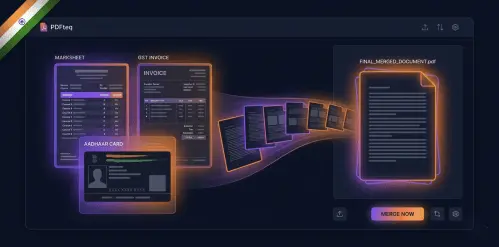
To merge PDFs for Indian government portals, go to PDFTeq's free Merge PDF tool, upload your files, drag them into the correct order, and click Merge & Download. For UPSC, keep the output between 50 KB – 300 KB. For the GST portal, stay under 5 MB per document. For ITR AY 2026-27, combine Form 16, AIS, rent receipts, and investment proofs into one clean PDF. No login. No watermarks. Your Aadhaar and PAN data never leave your device.
India's digital government infrastructure has never moved faster. UPSC 2026 applications go fully online. GST compliance under the new Reforms 2.0 mandates e-invoicing for every business above ₹5 crore turnover. And the rollout of the Income Tax Act 2025 has changed the documentation landscape for AY 2026-27 filing.
In the middle of all this progress sits a frustratingly old problem: you have seven documents and one upload slot. Your university degree, your 10th marksheet, your OBC certificate, your identity proof — each a separate PDF — and the portal only accepts one. One file. Under 300 KB.
Most people reach for random tools they found on Google and end up with watermarked output, blurry scans, or — worst of all — their Aadhaar card uploaded to some foreign company's server. This guide ends that problem. We will walk through exactly how to merge PDFs for each major Indian portal, the technical constraints behind each limit, and how PDFTeq handles it all locally in your browser without ever touching your data.
Why Indian Government Portals Have Such Tight File Size Limits
This isn't bureaucratic obstinacy. India's government portals were engineered to serve hundreds of millions of users across 2G and low-bandwidth connections simultaneously. The UPSC portal alone receives over 1 crore application attempts during peak cycles. If every applicant uploaded a 5 MB PDF, the infrastructure would collapse.
The 300 KB UPSC limit is a deliberate balance between readability and bandwidth. The 5 MB GST limit accounts for multi-page tax invoice bundles while keeping server load manageable. Understanding this helps you approach the problem correctly — you aren't fighting the portal, you're working within an infrastructure designed for scale.
PDFTeq's merge engine uses WebAssembly (WASM) with the pdf-lib library, running entirely in your browser. During merge, it performs cross-reference table consolidation and removes redundant object duplicates that accumulate when multiple PDFs are combined naively. This typically reduces the merged output by 15–35% compared to just concatenating files — helping you clear those tight portal limits without re-compressing images.
The Privacy Problem Nobody Talks About
Before we get into the how-to, this needs to be said clearly: most PDF merge tools upload your files to their servers. For personal documents — a grocery list, a recipe — this is inconvenient. For Indian government documents, it's a serious risk.
Consider what a typical UPSC document bundle contains: your Aadhaar card (12-digit UID, biometric link), your PAN card, caste certificate, and address proof. Uploading these to a random foreign server violates your rights under India's Digital Personal Data Protection Act 2023 (DPDPA) and exposes you to identity fraud risk.
PDFTeq processes everything inside your browser's sandboxed environment using WebAssembly. Zero bytes of your documents are transmitted anywhere. The merge happens on your machine — the same way a desktop application would work, but without the installation.
Step-by-Step: Merging PDFs for UPSC 2026 (The 300 KB Challenge)
Combined document PDF: 50 KB minimum – 300 KB maximum. Files outside this range are rejected automatically. Scanned certificates at 200 DPI typically produce 80–120 KB per page at A4 size.
The UPSC Detailed Application Form (DAF) requires applicants to upload a single merged PDF containing educational certificates, identity proof, caste certificate (if applicable), and the "Triple Signature" specimen — all in one file, all under 300 KB.
Scan each document at 150–200 DPI in grayscale (not colour, unless colour is required). An A4 page scanned at 200 DPI in grayscale produces approximately 60–90 KB. Scanning at 300 DPI colour produces 500 KB+ per page — completely outside UPSC limits before you even begin merging.
Navigate to pdfteq.com/tools/merge-pdf. No account. No email. No installation. The WebAssembly engine loads directly in your browser on Chrome, Firefox, Edge, or Safari — including mobile browsers on Android and iPhone.
Drag and drop your PDFs or click to browse. Upload them in the required UPSC sequence: typically — Photo & Signature → 10th Marksheet → 12th Marksheet → Degree Certificate → Identity Proof → Category Certificate. Drag the thumbnails to reorder if needed. If any pages are sideways from scanning, use the rotate tool before merging.
Toggle Maximum Compression in the settings panel. PDFTeq will consolidate shared font references and image metadata across all uploaded files, reducing the merged output without re-encoding content. Check the live file size estimate before downloading.
Before downloading, preview each page in the built-in viewer. Confirm text is legible, signatures are visible, and page order is correct. Click Merge & Download. Open the output file and check the file size — it must be between 50 KB and 300 KB for UPSC submission.
If your merged file exceeds the limit after compression, the culprit is almost always a colour-scanned certificate. Open the oversized PDF separately, convert it to grayscale (your phone scanner app likely has this setting), re-scan at 150 DPI, and replace it. One colour photo-quality page can account for 60% of your total file size.
Merge Your UPSC Documents Now
Browser-based · Lossless · Under 300 KB · Zero Data Upload
Open Free PDF MergerStep-by-Step: Merging PDFs for the GST Portal (Batched Invoices)
5 MB maximum per document. Maximum 10 documents per upload batch. Under GST Reforms 2.0, e-invoicing is mandatory for businesses with turnover above ₹5 crore. File names must contain no special characters, spaces, or Hindi/vernacular script — use only A–Z, 0–9, hyphens, and underscores.
GST compliance in 2026 means merging monthly invoice batches, ITC claim support documents, and amendment letters into clean, portal-ready PDFs. The most common mistake: uploading 12 individual invoices when you need to group them into two batches of 10 — with each batch as a single merged PDF under 5 MB.
The GST Invoice Bundle Workflow
- Step 1 — Group by GSTIN: Sort invoices by supplier GSTIN before merging. GSTN officers cross-reference merged bundles with GSTR-2A data. A logical grouping reduces query notices.
- Step 2 — Name Files Correctly: Use a format like
INVOICE-BUNDLE-JAN2026-01.pdf. Avoid spaces, brackets, or symbols like ₹ in file names — the portal's file parser treats these as invalid input. - Step 3 — Merge in PDFTeq: Upload your sorted invoices, confirm page order, and download the merged bundle. For 10-invoice bundles of standard A4 invoices (scanned or digitally generated), the output is typically 800 KB – 2.5 MB — well within the 5 MB limit.
- Step 4 — Verify GSTIN Legibility: Before uploading, zoom into the preview on the first page of each bundle. The supplier GSTIN must be readable at 100% zoom. If it's blurry, the source scan is the problem — rescanning at 200 DPI black-and-white fixes it.
- Step 5 — Remove Blank Pages: Scanners often introduce blank pages between documents. Use PDFTeq's remove blank pages tool after merging to strip these automatically — they waste file size and confuse GST portal reviewers.
Step-by-Step: Merging PDFs for ITR Filing (AY 2026-27)
The transition to the Income Tax Act 2025 has restructured how deduction proofs must be submitted under the new regime. While the Act simplifies slabs, taxpayers opting into the old regime for AY 2026-27 must still submit consolidated proof packages via the income tax portal (incometax.gov.in).
What to Merge for ITR AY 2026-27
| Document Category | What to Include | Merge Into |
|---|---|---|
| Salary & Employer Docs | Form 16 Part A + Part B | form16-ay2627.pdf |
| Annual Information Statement | AIS (downloaded from portal) + TIS | ais-tis-ay2627.pdf |
| Section 80C Deductions | PPF passbook, ELSS statement, LIC premium receipt, tuition fee receipts | 80c-proofs-ay2627.pdf |
| Section 80D — Health Insurance | Premium payment receipt(s) for self and parents | 80d-insurance-ay2627.pdf |
| HRA Exemption | Rent receipts (all 12 months), landlord PAN, rental agreement first & last page | hra-proofs-ay2627.pdf |
| Home Loan (24B) | Bank interest certificate + provisional certificate | homeloan-24b-ay2627.pdf |
| Capital Gains | Broker P&L statements (quarterly) | capital-gains-ay2627.pdf |
Merge each category separately rather than creating one giant PDF for everything. This matches how the income tax portal's grievance system references documents — by category. It also makes any notice response (Section 143(1) or 148A) far more efficient because you can resubmit a single category rather than re-uploading everything.
Under the new Act, Section 80CCD(2) employer NPS contributions don't require paper proof — they're pre-filled in AIS. Focus your merge effort on rent receipts, insurance, and investment proofs which are most commonly queried during processing.
Bonus: Merging KYC Documents for EPFO and UAN Portal
EPFO's UAN portal requires KYC submissions — Aadhaar, PAN, and bank passbook — as a combined document in some scenarios, with a 2 MB file size limit. This is tighter than GST and requires the same approach as UPSC: scan in grayscale at 150 DPI, merge, and verify size before submitting.
For joint KYC submissions (EPFO joint declaration), merge the employee's ID proof with the employer's stamp-signed declaration as a two-page PDF. The delete pages tool is useful here if your scanned employer letter has extra blank pages at the end.
PDFTeq vs. Global Competitors — India Use Case Comparison
| Feature | PDFTeq | Adobe Acrobat Online | iLovePDF | Smallpdf |
|---|---|---|---|---|
| No Server Upload (Privacy) | ✅ Browser-only | ❌ Cloud upload | ❌ Cloud upload | ❌ Cloud upload |
| Free with No Watermarks | ✅ Always | ❌ Subscription | ✅ Yes | ⚠️ Limits apply |
| No Login Required | ✅ Always | ❌ Adobe ID needed | ⚠️ Limited free use | ⚠️ Limited free use |
| UPSC 300 KB Preset | ✅ Yes | ❌ No | ❌ No | ❌ No |
| GST 5 MB Preset | ✅ Yes | ❌ No | ❌ No | ❌ No |
| Safe for Aadhaar / PAN | ✅ Yes — local only | ❌ Not recommended | ❌ Not recommended | ❌ Not recommended |
| Works on Low-End Android | ✅ Yes (WASM optimised) | ⚠️ App required | ✅ Yes | ✅ Yes |
| Hindi/Regional Language UI | 🔜 Coming 2026 | ❌ No | ❌ No | ❌ No |
| Blank Page Auto-Removal | ✅ Separate tool | ⚠️ Manual | ❌ No | ❌ No |
| Works Offline (after load) | ✅ Yes | ❌ No | ❌ No | ❌ No |
PDFTeq Merge Tool: Key Features for Indian Users
- 🔒 Zero-Server Privacy: WebAssembly processes files in your browser. Aadhaar, PAN, bank statements — none of it leaves your device.
- 📐 Drag-to-Reorder: Rearrange pages or entire files by dragging thumbnails — essential for UPSC document sequence compliance. Also available: the dedicated reorder PDF tool for complex sequences.
- 📄 Selective Page Deletion: Accidentally included an extra page? Remove it instantly without starting over using the delete pages tool.
- ↩️ Rotation Correction: Mobile-scanned certificates often come in sideways. Fix orientation before merging — one click, permanently encoded.
- 🗑️ Blank Page Removal: Auto-strip scanner-generated blank pages before or after merging with the remove blank pages tool.
- 🔢 Page Numbering: Add page numbers to your merged document before submission using the add page numbers tool — some portals and officers request numbered pages in large submissions.
- 📱 Full Mobile Support: Works on Chrome and Safari on any Android or iOS device. Designed for users on budget smartphones — common among first-generation UPSC aspirants.
- ✈️ Offline Capable: Once loaded, no internet needed. File an ITR from a train, a village internet centre, or anywhere with an unreliable connection.
Ready to Merge Your Government Documents?
UPSC · GST · ITR · EPFO — All Portals, One Tool, Zero Risk to Your Data
Merge PDF Free — No SignupUse Cases: Who Needs This Guide
🎓 UPSC / State PSC Aspirants
Civil services aspirants dealing with DAF submissions, admit card document bundles, or interview call letter packages. One missed document or a file that's 1 KB over the 300 KB limit means re-uploading the entire bundle — losing time during peak application windows.
🏢 GST-Registered Business Owners and CAs
Chartered accountants managing GST filings for multiple clients, or SME owners handling their own compliance. Merging monthly invoice bundles, credit note packages, and ITC reconciliation documents before portal upload is a recurring task — one that needs to be fast, clean, and size-compliant.
💼 Salaried Employees Filing ITR
Salaried professionals with multiple deduction sources — HRA claims, home loans, 80C investments, and 80D insurance premiums — who need to create clean documentation packages for their CA or for direct filing on the income tax portal.
🏭 MSME Owners Applying for Government Schemes
MSME applications on the Udyam portal, PM Vishwakarma scheme, or state government loan schemes frequently require merged document bundles: registration proof, GST certificate, Aadhaar of proprietors, and bank statements — all in one PDF under a specified size limit.
🎓 Students Applying to Central Universities / NTA
NTA's CUET and JEE/NEET admission portals require combined document uploads for category certificates, income proof, and identity documents. The file size constraints are similar to UPSC, and the same 150 DPI grayscale + PDFTeq merge workflow applies.
Pro Tips & Expert Insights
💡 Tip 1: Scan Once, Use Everywhere
Create a "master scan folder" of all your government documents scanned at 200 DPI grayscale. Store these as individual PDFs. Every time you need a merged bundle for a portal, you pull from this folder — no re-scanning, no quality inconsistencies, no wasted time.
💡 Tip 2: Always Merge, Then Compress — Never Both Simultaneously
Some tools try to compress and merge at the same time. This often creates unpredictable output sizes. The reliable method: merge first (PDFTeq handles this losslessly), then check the size. Only apply compression if needed, and use the compress PDF tool as a second step.
💡 Tip 3: Name Your Files Before Uploading
Government portals log the file name you upload. For audit or grievance purposes, use descriptive names like UPSC-DAF-Certificates-[YourName]-2026.pdf rather than merged-output-1.pdf. It also helps your CA reference the right document during ITR queries.
💡 Tip 4: Add Page Numbers for Large Submissions
For ITR deduction proof bundles or GST audit submissions that run over 10 pages, add page numbers before submitting. Officers reviewing physical printouts of digital submissions navigate by page number. Use the add page numbers tool as the final step in your workflow.
💡 Tip 5: The Long-Tail Keyword Insight for Tool Sites
If you manage a PDF tool website, stop targeting the generic term "merge PDF." In the Indian market, intent-specific queries are the winners: "merge Aadhaar and PAN for home loan", "combine marksheets for UPSC DAF under 300KB", and "merge ITR documents for CA audit" have near-zero competition and high conversion intent. See the full PDFTeq blog for more tool strategy guides.
People Also Ask
- How do I merge PDFs for UPSC DAF under 300 KB?
- Is it safe to merge Aadhaar and PAN online?
- What is the file size limit for the GST portal in 2026?
- How do I combine Form 16 and AIS for ITR filing?
- Can I merge PDF files on my phone for free without a watermark?
- How do I merge PDFs without uploading them to a server?
- What is the best free PDF merger for Indian government portals?
- How do I reduce a merged PDF to under 300 KB for UPSC?
- Can I merge password-protected bank statements for ITR?
- How many documents can I upload at once on the GST portal?
Frequently Asked Questions
Conclusion: Don't Let a File Size Error Cost You an Opportunity
A 301 KB file getting rejected by the UPSC portal isn't a technical failure — it's a preventable one. A GST upload getting rejected because the file name contained a bracket is a compliance problem with a two-minute fix. These are the invisible friction points that frustrate millions of Indian digital citizens every year.
PDFTeq was built specifically to eliminate this friction. Browser-based processing keeps your Aadhaar and PAN data on your device where it belongs. Lossless merging means your certificates remain readable after combining. And the complete workflow — merge, reorder, rotate, delete blank pages, add page numbers — is available free, without watermarks, without an account, on any device.
Whether you're finalising your UPSC DAF tonight, submitting GST invoices before the deadline, or building your ITR deduction proof package for AY 2026-27, the tool is ready. Open it, use it, and move on to what actually matters.
Merge Your PDF Documents — Free, Private, Instant
UPSC · GST · ITR · EPFO · NTA · All Indian Portals · No Data Risk
Merge PDF Free Now