The quick takeaway
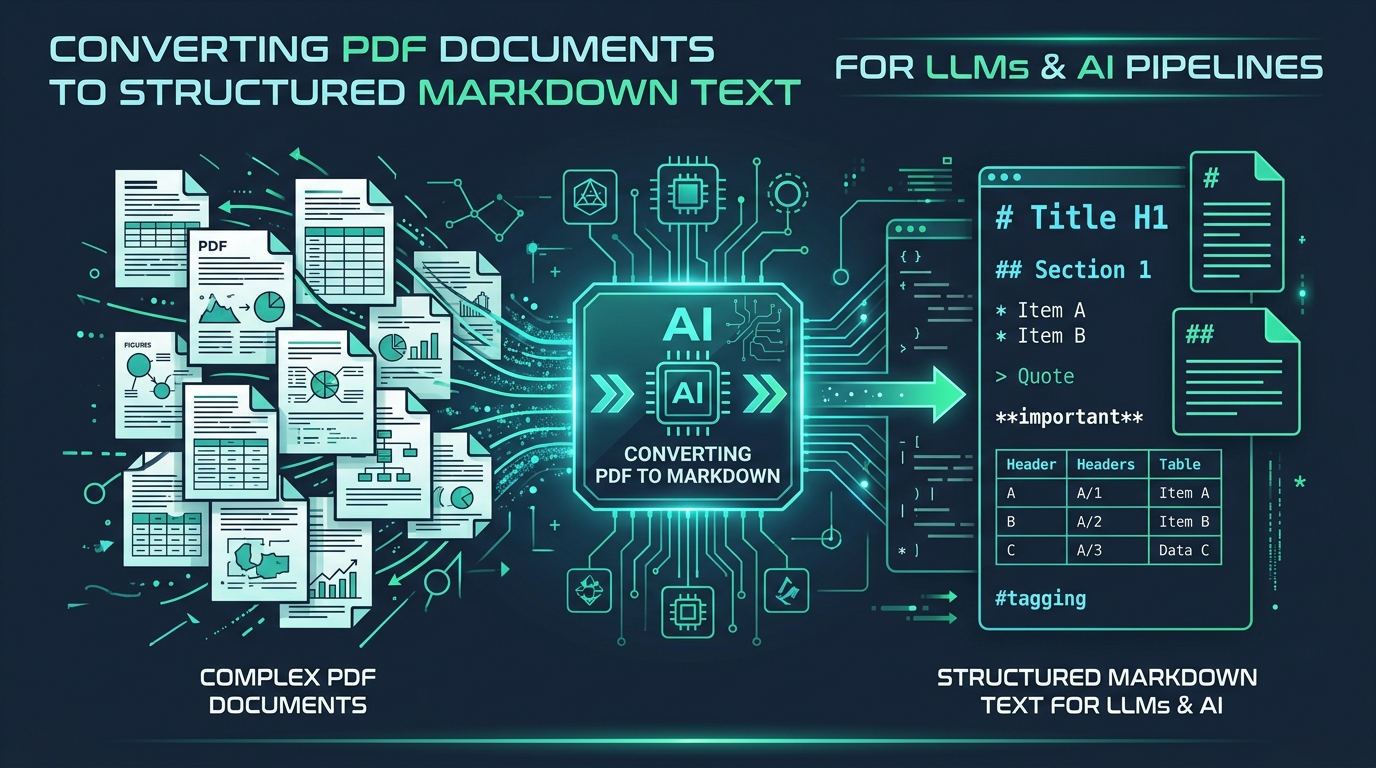
PDF documents do not contain semantic text or paragraphs—they store individual character glyphs positioned across a 2D canvas. When you copy-paste raw text into an LLM or vector chunker, you introduce broken sentences, concatenated multi-column lines, and fragmented tables. Converting your PDF to structured Markdown restores document hierarchies (# H1, ## H2), preserves tabular columns, strips repetitive running headers and footers, and repairs end-of-line hyphenation before your prompt hits ChatGPT, Claude, or your RAG vector database.
If you have ever pasted a 20-page research paper or financial quarterly report into an AI chat window or ingestion pipeline, you know the frustration. The model hallucinates key figures because numbers from Table Column 1 were slammed into Column 3, or it misattributes quotes because a two-column layout was read left-to-right across the horizontal gutter.
Markdown has become the lingua franca of large language models. Frontier models like GPT-4o, Claude 3.5 Sonnet, and Gemini 1.5 Pro are natively trained on trillions of tokens formatted in Markdown. When text arrives with explicit header markers (#), bullet points (-), and GitHub Flavored Markdown (GFM) pipe tables (| Col | Col |), reasoning accuracy jumps and chunking becomes deterministic.
On this page
- 1. Why LLMs and RAG Pipelines Demand Markdown
- 2. The Anatomy of a PDF: Why Extraction Fails
- 3. Solving the Multi-Column Reading Order Problem
- 4. Hyphenation Repair and Tabular Alignment
- 5. Tool Comparison: Browser vs Python (Docling, Marker, MarkItDown)
- 6. Step-by-Step: Converting PDFs Locally on PDFTeq
- 7. Best Practices for RAG Chunking and Token Management
- 8. Frequently Asked Questions
1. Why LLMs and RAG Pipelines Demand Markdown
Large language models process text as a sequential stream of tokens. While modern frontier models boast context windows from 128k to 2 million tokens, context quality matters far more than context volume. When raw, unformatted text enters the context window, several critical failure modes emerge:
Raw PDF Text Problems
- • Loss of hierarchy: Section headers look identical to body sentences.
- • Table chaos: Cells lose horizontal alignment and blur into single lines.
- • Noise tokens: Repeated running headers, footers, and page numbers pollute embeddings.
- • Hyphen fragmentation: Words like
infor- mationdistort semantic embeddings.
Clean Markdown Benefits
- • Semantic anchors:
#and##give LLMs instant document outlines. - • GFM tables: Rows and columns are preserved using standard pipe notation.
- • Deterministic chunking: Split on exact section boundaries rather than character cuts.
- • De-duplicated context: Running headers and footers are cleanly filtered out.
2. The Anatomy of a PDF: Why Extraction Fails
To understand why simple copy-pasting fails, you must understand how Adobe designed the PostScript and Portable Document Format (PDF) specification. A PDF is fundamentally a vector drawing instruction set. When a page renders, the internal content stream looks like this:
/F1 12.000 Tf
72.000 710.400 Td
(Revenue for Q3 reached) Tj
310.500 0.000 Td
($14.2M) Tj
ET
Notice what is missing: there is no <paragraph> tag, no <table> element, and no column boundary. The PDF engine simply paints character strings at absolute 2D Cartesian coordinates (x, y). A human eye groups these elements visually using Gestalt proximity principles, but a machine reading the stream in file order or strictly top-to-bottom can easily produce gibberish.
3. Solving the Multi-Column Reading Order Problem
Academic journals (such as IEEE, ACM, Nature, and arXiv preprints), legal filings, and newspapers frequently format text into two or three vertical columns. When simple extractors read a page with two columns, they sort text elements solely by vertical position. Because Line 1 of Column 1 and Line 1 of Column 2 share roughly the same vertical baseline, the text is merged horizontally across the column gutter.
PDFTeq’s client-side converter inspects the distribution of text bounding boxes across the page width. If a distinct horizontal empty band (a gutter between 38% and 62% of page width) is detected with substantial text on both sides, the algorithm partitions the page: any full-width title or abstract at the top is parsed first, followed by the left column read top-to-bottom, followed by the right column read top-to-bottom, and finally any full-width footnotes or bottom spanning blocks.
4. Hyphenation Repair and Tabular Alignment
Two subtle issues severely degrade embedding quality in vector databases:
End-of-Line Hyphenation Repair
Typesetting engines routinely insert hyphens to justify right margins. When a word like multi-column or con- verter is broken across lines, standard copy-pasting yields either broken tokens or missing words. Our converter inspects adjacent lines within the same vertical block: if a line ends with an alphabetical character followed by a hyphen (e.g. [A-Za-z]-) and the next line begins with a lowercase letter, the hyphen is removed and the word is seamlessly re-joined.
Tabular Alignment via Heuristic Clustering
Tables in PDFs rarely contain borderlines that programmatic text extractors can read. Instead, they are whitespace-aligned. Our converter detects consecutive lines that share multiple common horizontal tab stops and format them as Markdown pipe tables with a clean separator row (|---|---|). If a table has clear numeric columns, they remain structured and queryable by LLMs.
5. Tool Comparison: Browser vs Python (Docling, Marker, MarkItDown)
Different document ingestion workflows require different tools. Here is an honest, objective breakdown of how PDFTeq compares to popular command-line and machine-learning frameworks:
| Feature / Capability | PDFTeq (Browser) | IBM Docling | Marker (Vik Paruchuri) | MS MarkItDown |
|---|---|---|---|---|
| Installation & Setup | Zero (runs in browser) | Python, PyTorch (~2GB) | Python, PyTorch, CUDA | Python package (pip) |
| Privacy & Data Locality | 100% Client-Side (no upload) | Local machine | Local machine | Local machine |
| Execution Speed | Sub-second (instant) | 5–15 sec / page (CPU/GPU) | 2–8 sec / page (GPU) | Fast (heuristics) |
| Scanned PDF (OCR) | Requires prior OCR | Built-in OCR models | Surya OCR built-in | Depends on plugins |
| LaTeX / Math Equations | Plain Unicode approximations | Full LaTeX extraction | Full LaTeX extraction | Plain text |
| Best Use Case | Fast interactive conversion of confidential PDFs | Batch ingestion of complex scientific papers | Book & deep academic conversion | Simple multi-format Python pipelines |
When to use PDFTeq: You need an immediate, zero-friction conversion of financial statements, agreements, business reports, or articles without sending sensitive data over the wire or spinning up a Python virtual environment.
When to use Docling or Marker: You are ingesting thousands of scanned academic papers containing complex multiline LaTeX equations, embedded chemical structures, or heavily nested matrices.
6. Step-by-Step: Converting PDFs Locally on PDFTeq
Converting your PDF to Markdown takes less than five seconds using PDFTeq:
- Open the tool: Navigate to PDF to Markdown Converter in any modern browser (Chrome, Edge, Firefox, Safari).
- Drop your PDF: Drag and drop your file into the dashed dropzone or click to select from your device. You will notice instant responsiveness because the file is read directly into your browser's memory without an upload progress bar.
-
Configure output options:
- Check "Include page markers" if you plan to chunk documents by page (
<!-- page 1 -->) for RAG source citations. - Uncheck if you want continuous reading text for summarizing or prompting.
- Check "Include page markers" if you plan to chunk documents by page (
- Review the Markdown & Token Count: Inspect the output preview. The status bar provides an instant estimation of word and token counts (~4 characters per token heuristic).
- Export or Copy: Click "Copy" to copy the entire document, click "Copy by Page" to get structured page chunks with separators, or click "Download .md" to save the file locally.
7. Best Practices for RAG Chunking and Token Management
Once you have converted your PDF to Markdown, how should you store and index it in your vector database (such as Pinecone, Qdrant, Chroma, or pgvector)? Here are the recommended industry patterns:
1. Header-Aware Semantic Chunking
Instead of naive fixed-window token slicing (e.g. chunking every 500 tokens with 50-token overlap), use LangChain's or LlamaIndex's MarkdownHeaderTextSplitter. Configure it to split on #, ##, and ### tags. This guarantees that each chunk corresponds to an entire logical concept, keeping methods, findings, and prerequisites together.
2. Preserve Metadata in Chunk Headers
Prepend the document title and page number to the top of each vector chunk. For example:
### Revenue Breakdown
Operating margin expanded 320 bps year-over-year...
This allows your retrieval engine to cite specific page numbers back to the user when generating answers.
8. Frequently Asked Questions
Why should I convert PDFs to Markdown before feeding them to an LLM?
Markdown replaces raw PDF layout noise (floating coordinates, headers, footers, font tags) with clean semantic markup like headers, bullet lists, and tables. This gives the model explicit hierarchical context, avoids hallucinatory misreadings of column layouts, and simplifies semantic chunking for RAG vector databases.
Why do two-column academic papers get scrambled in standard PDF copy-paste?
PDFs do not store paragraphs or columns; they store individual character glyphs at absolute X/Y canvas coordinates. Naive extractors sort characters primarily by vertical position (Y coordinate), which reads across the horizontal gap and merges Line 1 of Column A with Line 1 of Column B. Proper converters detect the gutter between columns and read each column top-to-bottom sequentially.
Can this browser tool convert scanned image PDFs to Markdown?
No. The browser-based PDF to Markdown tool operates on the native embedded text layer. If your PDF is a photographic scan with no OCR layer, the text layer is empty. You must run an OCR step first (such as our Read PDF Aloud tool with client-side OCR, or Tesseract) before converting.
How does PDFTeq's converter compare to Docling, Marker, or Microsoft MarkItDown?
Docling and Marker use deep-learning vision models to reconstruct intricate tables and multi-column layouts, but require Python, heavy ML dependencies (PyTorch/CUDA), and hundreds of megabytes of downloads. MarkItDown is a lightweight Python library. PDFTeq runs 100% inside your browser using pdf.js—zero installation, zero uploads, instant execution, and complete confidentiality for proprietary documents.
Are my documents uploaded to any remote server?
No. The entire extraction and reflow pipeline executes locally in your browser tab via JavaScript and HTML5 Web Workers. No file data, text snippets, or telemetry are ever sent to PDFTeq or any third party.
How should I chunk Markdown documents for vector databases in RAG?
Because Markdown retains structural boundaries, you should chunk using a MarkdownHeaderTextSplitter (splitting on #, ##, and ### headers) or by page markers (<!-- page X -->). This guarantees that complete sections, tables, and lists stay intact rather than being sliced in half by arbitrary character limits.
Written by the PDFTEQ Team
We build and maintain PDFTeq's suite of secure, browser-first PDF utilities. Our tools run strictly on the client side using WebAssembly and modern JavaScript, ensuring private documents never leave your device.
More technical guides